Legal and mounting
Are dash cams legal in the UK? Where you can mount one
Dash cams are legal in UK cars, but where you put one matters. The windscreen rules, what an MOT tester checks, screens, phones and sharing footage.
A dash cam is one of the few car gadgets that the police actively ask drivers to use: several forces have online forms for submitting footage of dangerous driving. So the short answer is yes, dash cams are legal in the UK. The longer answer is about where you put one and how you use it, because the rules on your view of the road and on distraction apply to a dash cam like anything else in the car.
The rules that apply to a dash cam
There is no specific dash cam law in the UK. Instead, three sets of general rules apply.
Your view of the road
The Highway Code, in its annex on vehicle maintenance, says windscreens and windows MUST be kept clean and free from obstructions to vision. The capital MUST is how the Highway Code marks a legal requirement, and the law behind it is regulation 30 of the Road Vehicles (Construction and Use) Regulations 1986. That regulation requires a vehicle to be built so the driver has a full view of the road and traffic ahead, and it requires the glass to be kept in a condition that does not obscure the driver's vision while driving.
A dash cam is not mentioned by name, but the principle is simple: if your camera, its mount or its cable gets in the way of what you need to see, you are on the wrong side of these rules.
Distraction
Rule 149 of the Highway Code says you MUST exercise proper control of your vehicle at all times, and you must not use a hand-held mobile phone or similar device for any purpose while driving. Rule 150 warns about distraction from in-vehicle systems and says you should not be distracted by maps or screen-based information. If you need to look at screen information, the Highway Code advises you to stop somewhere safe first.
For a dash cam, that means: set it up, aim it and check the settings before you drive. If you want to save a clip after an incident, do it once you have stopped safely.
Screens that show video
If your dash cam has a large screen, such as a mirror dash cam or a dashboard screen with CarPlay, one more rule matters. Regulation 109 of the Road Vehicles (Construction and Use) Regulations 1986 says you must not drive if you can see a screen showing anything other than information about the state of the vehicle, its location, the road next to it, or how to reach your destination. Live camera views and maps are fine. Playing back recordings or films while driving, where the driver can see them, is not.
What an MOT tester checks
The MOT inspection manual published by the Driver and Vehicle Standards Agency covers the driver's field of vision in section 3.1. It lists two defects that are relevant to anything stuck to the windscreen:
- Minor: an obstruction within the driver's field of view that significantly affects the view in front or to the sides, outside the swept area of the windscreen.
- Major: an obstruction significantly affecting the driver's view of the road through the swept area of the windscreen.
The swept area is the part of the windscreen the wipers clear. Section 3.2 of the manual also defines zone A: a strip 290 mm wide, centred on the steering wheel, inside the swept area. That is the part of the glass directly in front of the driver, and it has the strictest limits for damage (more than 10 mm of damage in zone A is a defect, against 40 mm in the rest of the swept area).
The manual also says testers can remove items such as a sat nav or air fresheners that obstruct the driver's view of the road, as long as they tell the driver. A dash cam is not named; the question is whether it significantly affects your view.
Where to mount your dash cam
The usual place, and the one we recommend, is high in the centre of the windscreen, behind the rear-view mirror.
- Out of your line of sight. The mirror already blocks that bit of glass from your view, so a small camera behind it adds almost nothing.
- Well away from zone A. The camera sits on the passenger side of the mirror stem or directly behind it, not in front of the driver.
- Inside the swept area. Wipers keep the glass in front of the lens clear in rain, which matters for the footage.
- Not in the tinted band. Many windscreens have a shaded strip or a dotted black area at the top. Mount the camera just below it so the picture is not darkened.
Things to avoid:
- The area directly in front of the driver, and anywhere low on the windscreen.
- Airbag covers on the dashboard, and the area where the passenger airbag deploys.
- Loose cables across the glass or hanging down where they can catch your hand or the steering wheel. Tuck the cable into the headlining and down the side trim. Many cars have curtain airbags along the roof edge and pillars, so do not force the cable into places that could stop an airbag opening properly.
Small cameras make this easier
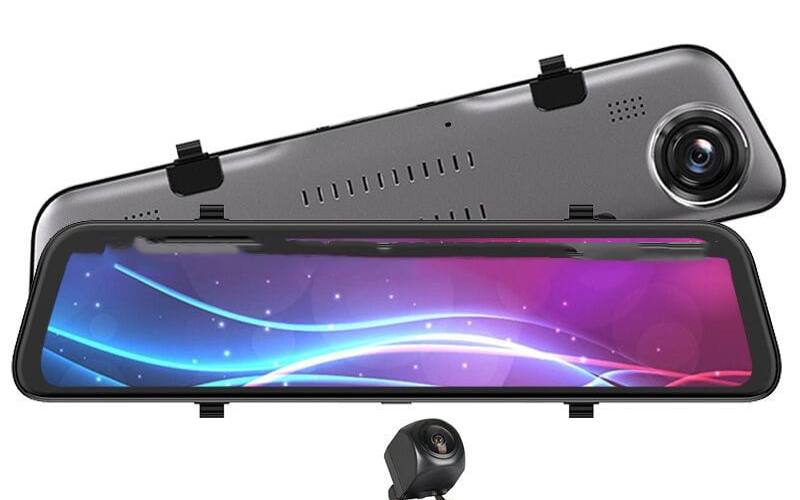
A compact camera disappears behind the mirror much more easily than a large one. Our mini WiFi dash cam has no screen and a camera body of about 45 mm, and our compact WiFi dash cam is shaped to tuck in behind the mirror. A mirror dash cam takes a different route: it straps over the mirror itself, so there is nothing extra on the glass at all. Just check that the unit does not hang lower than your own mirror into your view ahead.
Adhesive or suction mount?
An adhesive mount holds firmly and sits close to the glass, which keeps vibration down. A suction mount is easy to move but can drop off in hot or very cold weather, and a falling camera is a distraction you do not need. Whichever you use, clean the glass first and check the mount now and then.
Recording other people
Dash cams record other road users, pedestrians and, if the camera records sound, your passengers. A few points:
- Tell your passengers if the camera records sound, or turn audio recording off.
- Think before posting footage online. Number plates and faces are personal information. If you are sending footage to the police or an insurer, send it to them rather than posting it publicly.
- Using the car for work changes things. The Information Commissioner's Office treats cameras used for work purposes differently from cameras used only for domestic purposes, so if your dash cam is in a work vehicle, check the ICO's guidance.
Reporting what you record
If you capture dangerous driving, many police forces accept footage online. Devon and Cornwall Police, for example, runs Operation Snap for moving traffic offences such as careless driving, close passes and red light offences. It says it can usually only continue with submissions received within 10 days of the incident, that it is not for speeding, parking or collisions, and that you should be prepared to sign a witness statement and possibly give evidence in court. Check your own force's website for its process.
If you are involved in a collision that causes damage or injury, Highway Code rule 286 applies regardless of whether you have footage: you MUST stop, give your details to anyone with reasonable grounds to ask for them, and if you do not give your details at the scene, report it to the police as soon as reasonably practicable and in any case within 24 hours. Our guide Does dash cam footage help with insurance claims? covers what happens next.
In short
Mount the camera behind the mirror, keep the cable tidy and away from airbags, set it up before you drive, and a dash cam is entirely legal and very unlikely to bother an MOT tester. Ready to choose one? Start with our dash cams, or read Front and rear dash cam or mirror dash cam? if you want to cover the back of the car as well.
Frequently asked questions
Is it legal to have a dash cam in the UK?
Yes. There is no law against fitting a dash cam to a private car in the UK, and police forces accept dash cam footage from the public. What the law does control is your view of the road and the use of devices while driving, so the camera has to be mounted where it does not block your view.
Can a dash cam fail an MOT?
It can, if it significantly affects the driver's view. The MOT inspection manual lists an obstruction in the driver's view through the area the wipers sweep as a major defect, and an obstruction that significantly affects the view outside that area as a minor defect. A small camera tucked behind the rear-view mirror does not normally cause either.
Where is the best place to mount a dash cam?
High up in the middle of the windscreen, behind the rear-view mirror. The camera sees the road over the bonnet, the mirror hides it from your line of sight, and the area the wipers clear keeps the lens view clean.
Can I touch my dash cam while driving?
Avoid it. The Highway Code says you must exercise proper control of your vehicle at all times and warns against distraction from in-vehicle systems. Set the camera up before you set off, and pull over somewhere safe if you need to save a clip or change a setting.