How to
Wireless CarPlay adapter: will it work in your car?
What a wireless CarPlay and Android Auto adapter does, how to check your car is compatible, setup step by step, what to expect and quick fixes.
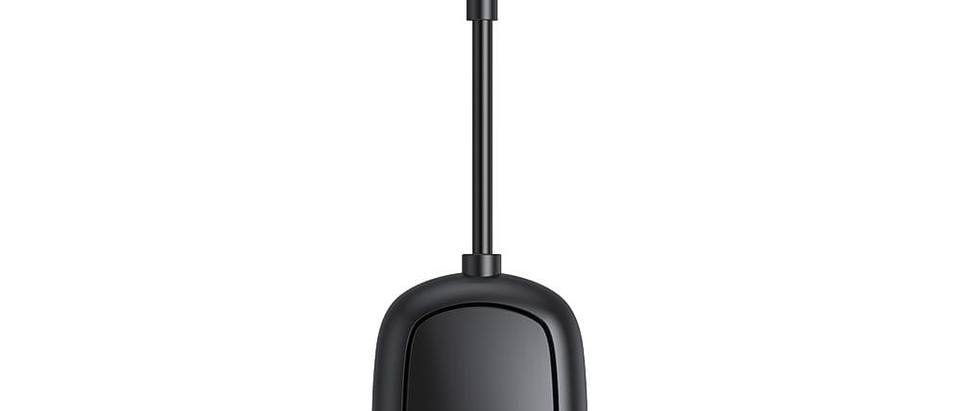
A wireless CarPlay adapter turns the cable connection in your car into a wireless one. It plugs into the USB port your car uses for Apple CarPlay or Android Auto, you pair your phone once, and from then on the phone connects without being plugged in. The one thing to check before you buy: your car must already show CarPlay or Android Auto when you connect your phone with a cable. An adapter does not add CarPlay to a car that does not have it.
How a wireless adapter works
To your car, the adapter looks like a phone plugged in with a cable. To your phone, it looks like a car with wireless CarPlay or Android Auto. The adapter sits in between and passes everything across.
Your phone uses two radios for this:
- Bluetooth to pair. Google's Android Auto help says the first wireless connection needs the phone and car paired by Bluetooth, and to keep Bluetooth, Wi-Fi and Location turned on during setup.
- Wi-Fi for the data. Apple's setup steps for wireless CarPlay ask you to turn Wi-Fi on and check that Auto-Join is on for the CarPlay network. For Android Auto, most of the data travels over Wi-Fi, because Bluetooth is too slow to carry the screen picture, while calls still use Bluetooth hands-free.
So both need to stay switched on whenever you drive.
Check your car and phone first
- Plug your phone in with a cable. Start the car and connect your phone to the USB port with a cable. If the CarPlay or Android Auto screen appears, an adapter can make it wireless. If nothing appears, or the car only plays music from the phone, the car has no CarPlay and an adapter will not help.
- Use the right USB port. If your car has more than one USB socket, use the one that gives you CarPlay. Apple says it may be labelled with a CarPlay icon or a smartphone icon.
- Check the car's settings. Google suggests checking that Android Auto is turned on in the car's infotainment system.
- Is it already wireless? Apple notes that some cars support CarPlay both wirelessly and with a cable. If your car already connects to your phone without a cable, you do not need an adapter. The handbook will say.
- Look the car up. Apple lists the car models that support CarPlay on its UK website, with a note that some models only have it in certain configurations. Google has a compatibility page for Android Auto. If in doubt, ask your dealer.
On the phone side, Apple asks for Siri to be turned on for CarPlay. For wireless Android Auto, Google lists a phone with Android 11 or higher, an active data plan and 5 GHz Wi-Fi support.
Which do you need?
| What your car does now | What to get |
|---|---|
| Shows CarPlay or Android Auto, but only with a cable | A wireless adapter |
| Already connects to CarPlay without a cable | Nothing, it is already wireless |
| Plays music over USB or Bluetooth, but never shows CarPlay | A portable CarPlay screen or a new head unit |
| Has no screen at all | A portable CarPlay screen |
Setting it up, step by step
- Park somewhere safe and start the car.
- Unplug any phone cable from the CarPlay USB port.
- On your phone, turn on Bluetooth and Wi-Fi. On an iPhone, check that Siri is on. On an Android phone, turn on Location too.
- Plug the adapter into the CarPlay USB port. If the port is USB-C, fit a small USB-C to USB-A adapter in between, because our adapter has a USB-A plug.
- Give the adapter a moment to start. Then open the Bluetooth settings on your phone, choose the adapter from the list and accept the prompts on the phone and on the car's screen.
- On an iPhone, go to Settings, then Wi-Fi, tap the info button next to the CarPlay network and check that Auto-Join is on.
- Wait for CarPlay or Android Auto to appear. If it does not start by itself, Apple suggests selecting the CarPlay logo on the car's display.
You only pair once. The next time you get in with Bluetooth and Wi-Fi on, the phone connects by itself, even from a pocket or bag.
What to expect day to day
- Start-up time. The adapter takes its power from the USB port, so it starts from cold each time you switch on, then has to find your phone. Our supplier says the wireless connection takes a few seconds longer to start than a cable. A specialist review of another adapter on CarPlay Life reported it typically connected within 20 seconds of switching on the ignition. If you set your route before you leave, give it a moment.
- A small delay. Wireless CarPlay sends music in a compressed format, and reviewers of adapters describe a short audio delay, most noticeable when you skip a track.
- Phone battery and warmth. With no cable, the phone does not charge, and it keeps Bluetooth and Wi-Fi busy for the whole drive. 9to5Google notes that phones can get particularly warm when used with an adapter. Apple says an iPhone used for navigation in hot conditions or direct sunlight may show a temperature alert, and charging can slow or stop. Keep the phone out of direct sun and use a charger on long drives.
- Sound. Music, calls and navigation prompts play through the car's speakers, as they did with the cable.
Firmware and updates
Apple's CarPlay help asks you to keep your iPhone on the latest version of iOS and your car's stereo on the latest firmware from the car maker. For aftermarket stereos, Google suggests checking the maker's website for firmware updates.
Some adapters also get their own firmware updates through a phone app or a web page. The supplier's details for our adapter do not mention firmware updates, so we do not promise any.
Troubleshooting
Work through these in order:
- Try the cable again. Unplug the adapter and connect your phone with a cable. If wired CarPlay or Android Auto no longer works, the problem is in the car or the phone, not the adapter.
- Restart. Apple suggests restarting the iPhone and the car. Google suggests restarting the car's infotainment system. Then unplug the adapter and plug it back in.
- Check Bluetooth and Wi-Fi. Both must be on. On an iPhone, check Auto-Join for the CarPlay network.
- Check restrictions. If an iPhone is not detected, Apple says to look in Screen Time. If Content and Privacy Restrictions is on, make sure CarPlay is allowed under Allowed Apps.
- Start again. On an iPhone, go to Settings, then General, then CarPlay, select your car and tap Forget This Car. On an Android phone, go to Settings, then Connected devices, Connection preferences, Android Auto and Previously connected cars, and choose Forget all cars. Remove the adapter from the phone's Bluetooth list as well, then pair from scratch.
Your car has no CarPlay at all?
Then an adapter is the wrong tool. A portable CarPlay screen sits on the windscreen or dashboard, runs from the 12V socket and connects to your phone without a cable, so it works in most cars with a 12V socket. Our 7-inch portable CarPlay and Android Auto screen has an IPS touch screen, a suction mount and a car charger for 12 to 24V sockets with a spare USB port. The supplier does not list its audio outputs, so read the sound section on the product page first.
How a portable screen compares with replacing the radio, including how the sound reaches your speakers, is covered in Portable CarPlay screen or a new head unit?. You can see all our portable CarPlay screens in one place.
About our adapter
Our wireless CarPlay and Android Auto adapter is an independent accessory compatible with Apple CarPlay and Android Auto, not an Apple or Google product. It is 2 in 1, so it works with iPhones (CarPlay) and Android phones (Android Auto). What the supplier lists:
- turns factory wired CarPlay or Android Auto into wireless,
- a USB-A plug on a short cable, so the adapter hangs down instead of sticking out of the port,
- ABS plastic, about 30 g,
- can move between cars that have wired CarPlay or Android Auto.
Know its limits before you order. Your phone does not charge through it. A car with only USB-C ports needs a small USB-C to USB-A adapter. The supplier lists factory wired CarPlay or Android Auto as the requirement, so we cannot promise it works with an aftermarket stereo. Browse our wireless CarPlay adapters.
Frequently asked questions
Does a wireless CarPlay adapter work in any car?
No. It only works in a car whose screen already shows Apple CarPlay or Android Auto when you plug your phone in with a USB cable. The adapter replaces the cable. It cannot add CarPlay or Android Auto to a car that does not have them; for that you need a portable CarPlay screen or a new head unit.
Does a wireless CarPlay adapter drain my phone battery?
Your phone does not charge through the adapter, and it uses Bluetooth and Wi-Fi for the whole drive, so the battery goes down instead of up. On longer journeys, plug the phone into a USB car charger. Keep it out of direct sun too, as phones can get warm when used with an adapter.
Why does the adapter take a while to connect after I start the car?
The adapter is powered by the car's USB port, so it starts up from cold every time you switch on, then finds your phone over Bluetooth and Wi-Fi. A wireless connection takes longer to appear than a cable. The supplier of our adapter says a few seconds longer.
Can I move the adapter to another car?
Yes, as long as the other car also shows CarPlay or Android Auto with a cable. Plug the adapter into that car's CarPlay USB port and follow the prompts on the car's screen the first time.